NoteTag

Coming soon.

Skip to content
NoteTag
Features Pricing Print QR codes Support Get the app
Features Pricing Print QR codes Support
Get the app

Free to start · iOS & Android

Stick any label on the box.
NoteTag remembers what's inside.

Take any barcode or QR code you already have — a sticker off a parcel, the code on a cereal box, a tag you printed — and make it yours. Scan it, then save photos, notes and reminders behind it. Everyone you share the space with sees the same thing.

Download on the App Store Get it on Google Play

No trial, no credit card. The free plan is a real plan — buy more room only when you outgrow it.

ATTIC · 08

Household · Attic

Winter box

+2
  • Fairy lights (2 sets)
  • Ski gloves — kids' size
  • Heavy blankets, top shelf
Swap out · 1 Nov M J A Shared with 4
  • No printer, no label maker
  • Works with codes you already own
  • Shared with your household
  • Scans and edits work offline

How it works

Three steps, and the box never lies to you again.

You do not need special stickers. You need a code, some tape, and thirty seconds.

  1. 1

    Find a code

    Any barcode or QR code will do. The one on the cereal box, the sticker off yesterday's parcel, an old loyalty card. Or print a sheet of proper tags, free, from your browser.

  2. 2

    Tape it to the thing

    The storage box, the jar, the toolbox, the crate in the garage. From that moment the code belongs to that object — it is your label now, whatever it used to say.

  3. 3

    Scan it and write

    Photograph what went in. Add a checklist, a reminder for when it needs looking at, a note for whoever opens it next. Scan the same code months later and it is all still there — and still editable.

What goes on a tag

A note is more than a word on masking tape.

Photos, checklists, reminders and everything else you would have to remember otherwise — attached to the object itself.

Photograph the contents. Don't describe them.

Before you seal the box, take a picture of what is in it. That one photo beats any list you were going to write. Scan the tag next winter and you are looking straight into a box you closed a year ago — without cutting the tape.

Everyone scans the same tag

Invite your household, your flatmates or your team to a Space. They scan the tag on the box and see your note, edit it, add to it. No one has to ask you where anything is.

The tag tells you when

Set a reminder on the note and it finds you later: the filter that needs changing, the food that expires, the box that has to go back up in the attic in November. Reminders go to everyone in the Space, not just to whoever set them.

Proper notes, not a text field

Headings, bold, bullet lists, tick-off checklists. Write the washing instructions, the wifi password for the holiday flat, the serial number, the thing you will absolutely forget by March.

Any code, not just QR

UPC, EAN, Code 128, Data Matrix, QR. If your camera can read it, NoteTag can label it.

Works in the basement

Scan, read and edit with no signal at all. Everything syncs the moment you are back online.

Private by default

A note is only visible inside its Space. Strangers scanning your box see an ordinary barcode.

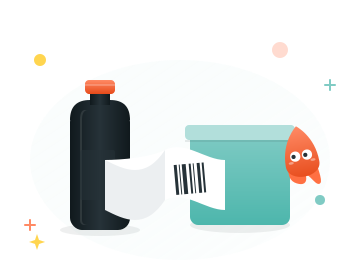
A barcode being cut from product packaging and taped onto a storage container

Bring your own code

Your house is already full of labels. They just say the wrong thing.

Every parcel, every packet, every jar comes with a code printed on it. When you tip the rice into a container, the bag still has its barcode. Cut it off, tape it to the container, scan it once — and that code now means your rice, with the date you opened it and a photo of the recipe on the back of the packet.

The code itself never changes. Shops, scanners and other apps read exactly what they always read. Your note is a private layer on top, visible only inside NoteTag.

Want matching tags instead of cut-out packaging?

Print a free QR sheet

Where people use it

Anything you close, stack or hand to someone else.

Attic & storage boxes

A photo of what went in, taken the day you sealed it. No more opening four boxes to find the tree stand.

Moving house

Tag every box as you pack. Everyone helping can scan and see which room it belongs in and what is fragile.

Pantry jars & refills

Contents, allergens and the date it was decanted — kept current every time you refill, not just the first time.

Freezer bags

What it is, when you froze it, and a reminder to eat it before it becomes an archaeological find.

Tools & spare parts

Which screws are in which drawer, which blade fits which saw, where the manual actually went.

Kids' kit

Swim bag, school bag, activity box — a shared checklist the whole family can tick off and update.

Plants & garden

A tag on the pot with the species, the watering rhythm, and a repeating reminder so it stops dying.

Appliances & maintenance

Stick a code on the boiler. Filter size, service date, the plumber's number — right where the problem is.

Lending things out

Who has the drill, since when, and what came in the case with it.
Pricing

Start free. Buy more room when the house outgrows it.

Free is the entry plan, not a countdown — one Space, twenty notes, one person to share it with. When that stops being enough, a paid plan simply buys you more of the same thing.

Save 33%

Free

$0

Where everyone starts. No card, no countdown.

  • Notes per Space20
  • Members per Space2
  • Spaces you own1
  • Spaces you can join1
  • Note length1,500
  • Photos per note1
Most households

Family

$7.99$0.99 /year/month

About 67¢ a month, billed once.Or $7.99 a year and save a third.

  • Notes per Space75
  • Members per Space5
  • Spaces you own2
  • Spaces you can join2
  • Note length5,000
  • Photos per note2

Pro

$19.99$2.49 /year/month

For whole houses, workshops and small teams.Or $19.99 a year and save a third.

  • Notes per Space225
  • Members per Space15
  • Spaces you own3
  • Spaces you can join4
  • Note length15,000
  • Photos per note5

Plans are bought and managed through the App Store or Google Play, and you can cancel there at any time. Stop paying and nothing is deleted — your notes stay, the Space simply returns to free limits.

Questions

The things people ask first.

Something else on your mind? Head to support — a real person answers.

Do I need to print anything?

No. Any barcode or QR code already in your home works — the code on a cereal box, a parcel sticker, an old loyalty card. Cut it out, tape it on, scan it. If you would rather have matching tags, notetag.app/print generates printable QR sheets for free.

Does the barcode still work normally?

Yes. NoteTag never changes the code itself — it reads the code and looks up your note. Tills, scanners and other apps see exactly what they saw before.

What if two boxes have the same barcode?

They share one note, because they are the same code. When two things need separate notes, give them different codes — two different parcel stickers, or two printed QR tags.

Can my family see my notes?

Only if you invite them. Notes live inside a Space. Invite people to that Space and everyone scanning the same tag sees the same note — as an admin, an editor or a viewer, whichever you choose.

Does it work without a signal?

Yes — which matters, because storage lives in basements and garages. Scanning, reading and editing all work offline, and changes sync as soon as you are back online.

What happens if I stop paying?

Nothing is deleted. Your notes stay where they are and you keep reading them; the Space simply returns to free-plan limits for new content.

The NoteTag mascot welcoming you to the app

Go and find a barcode.

There is one in the recycling right now. Download NoteTag, scan it, and give it a job.

Download on the App Store Get it on Google Play

iOS 16+ or Android 8+. Free to download, free to keep using.

NoteTag

Customise any barcode or QR code you can find, and never wonder what is in the box again.

Product

  • Features
  • Pricing
  • Print QR codes
  • Support

Legal

  • Privacy Policy
  • Terms of Service
  • Imprint

© 2026 NoteTag